


Transform your Raspberry Pi into a powerful machine learning hub by implementing advanced edge computing techniques that process data locally and deliver real-time insights. TensorFlow Lite and OpenCV now run efficiently on the Pi 4’s quad-core processor, enabling everything from computer vision to natural language processing at the edge. Modern optimization frameworks like ONNX Runtime and TensorFlow Lite’s model quantization reduce resource consumption while maintaining accuracy, making complex ML models accessible on this $35 computer. Whether you’re building a smart security camera, an automated plant monitoring system, or a voice-controlled home assistant, the Pi’s GPIO pins and extensive ML library support provide the perfect platform for experimentation and deployment.
The democratization of machine learning through affordable, accessible hardware like the Raspberry Pi has opened new possibilities for hobbyists, educators, and professionals alike. This guide will explore practical implementations, optimization strategies, and real-world applications that leverage the Pi’s full potential for machine learning projects.
Setting Up Your Raspberry Pi for Machine Learning
Hardware Requirements and Optimization
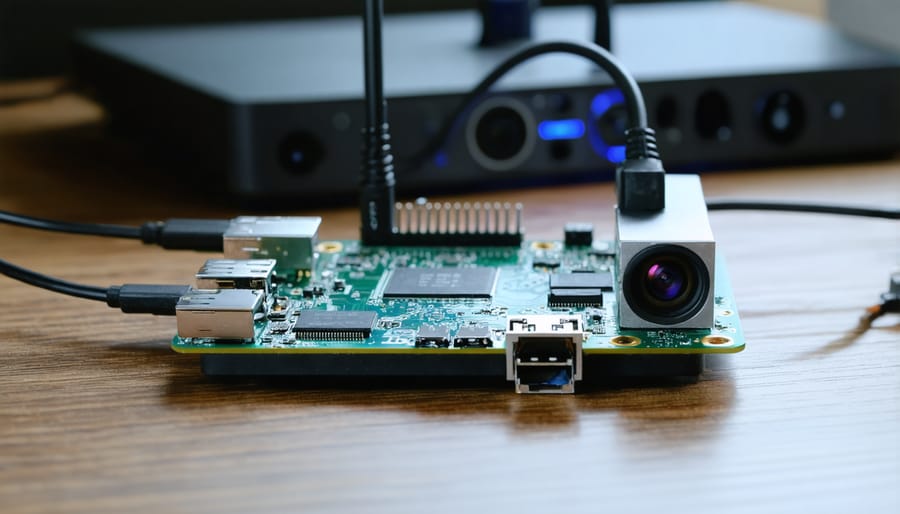
For optimal machine learning performance on a Raspberry Pi, you’ll need at least a Raspberry Pi 4 Model B with 4GB or 8GB RAM. While the 2GB variant can handle basic ML tasks, the additional memory in higher models provides better performance for complex models. To optimize hardware performance, proper cooling is essential. A combination of heat sinks and a small fan is recommended, as ML operations can cause significant CPU load and thermal throttling.
Storage requirements depend on your models, but a minimum of 32GB microSD card (Class 10 or higher) is recommended. For better performance, consider using USB 3.0 SSD storage. The official Raspberry Pi power supply (5.1V/3A) is crucial, as inadequate power can cause stability issues during intensive ML operations.
Additional hardware considerations include:
– Good quality case with ventilation
– GPIO header extension for sensor connections
– Camera module for computer vision projects
– Dedicated USB hub for multiple peripherals
Remember to monitor CPU temperature using built-in tools like vcgencmd measure_temp to ensure stable operation during extended ML processing tasks.
Essential Software Stack Installation
Setting up your Raspberry Pi for machine learning requires installing several essential software packages. Let’s walk through the installation process step by step.
First, update your Raspberry Pi’s package list and upgrade existing packages:
“`bash
sudo apt-get update
sudo apt-get upgrade
“`
To install TensorFlow Lite, which is optimized for the Pi’s ARM architecture, run:
“`bash
pip3 install tflite-runtime
“`
For computer vision projects, OpenCV is essential. Install it using:
“`bash
sudo apt-get install python3-opencv
“`
You’ll also need NumPy for numerical computing:
“`bash
pip3 install numpy
“`
To enhance your ML capabilities, install scikit-learn:
“`bash
pip3 install scikit-learn
“`
For working with datasets and analysis, install pandas:
“`bash
pip3 install pandas
“`
Remember to verify your installations by running Python3 and importing each package:
“`python
import tflite_runtime
import cv2
import numpy
import sklearn
import pandas
“`
If you encounter any memory errors during installation, try increasing your swap space or installing packages one at a time. These tools form the foundation of your ML projects on Raspberry Pi, enabling everything from image recognition to data analysis.
Implementing Machine Learning Models
Model Optimization Techniques
Running machine learning models efficiently on a Raspberry Pi requires careful optimization due to its limited resources. Several proven techniques can help reduce model size and improve inference speed without significantly compromising accuracy.
Quantization is one of the most effective methods, converting 32-bit floating-point weights to 8-bit integers. This technique can reduce model size by up to 75% while maintaining most of the model’s accuracy. For instance, a typical image classification model might shrink from 80MB to just 20MB after quantization.
Model pruning removes unnecessary connections and neurons from your neural network, creating a lighter version that runs faster. You can often remove up to 30% of the parameters without noticeable performance degradation. Combine this with quantization for even better results.
Knowledge distillation is another powerful approach, where a smaller “student” model learns from a larger “teacher” model. This creates compact models specifically optimized for edge devices like the Raspberry Pi. TensorFlow Lite’s model optimization toolkit makes implementing these techniques straightforward.
Consider using lightweight architectures designed for mobile devices, such as MobileNet or EfficientNet. These models are built with resource constraints in mind and perform well on the Pi. For optimal performance, you can also leverage the Pi’s hardware acceleration capabilities through libraries like ONNX Runtime or TensorFlow Lite’s delegate system.
Real-time Processing Strategies
When implementing machine learning on Raspberry Pi for real-time applications, several key strategies can help optimize performance. First, consider using model quantization to reduce the computational load. This technique converts your model’s weights from 32-bit floating-point numbers to 8-bit integers, significantly improving processing speed while maintaining acceptable accuracy.
Threading is another crucial strategy for real-time processing. By separating input capture, inference, and output handling into different threads, you can create a pipeline that processes data more efficiently. This approach prevents bottlenecks and ensures smooth operation, especially when handling video or sensor data streams.
Memory management plays a vital role in maintaining consistent performance. Implement circular buffers for streaming data and regularly clear unused variables to prevent memory leaks. For image processing applications, consider working with lower resolutions or Region of Interest (ROI) processing to reduce computational overhead.
Edge optimizations like frame skipping in video applications or implementing a sliding window for sensor data can help maintain real-time performance. Additionally, using lightweight ML frameworks specifically designed for edge devices, such as TensorFlow Lite or OpenVINO, can significantly improve processing speed.
Remember to monitor your Pi’s temperature and CPU usage during real-time processing. If necessary, implement throttling mechanisms to prevent overheating while maintaining critical functionality. These strategies, when properly implemented, can help achieve reliable real-time performance for your machine learning projects on Raspberry Pi.
Power Management Considerations
When deploying machine learning models on a Raspberry Pi, power management becomes crucial, especially for battery-powered or remote applications. The Pi’s power consumption can vary significantly depending on your model’s complexity and processing requirements, typically ranging from 2W to 6W under different loads.
To optimize power consumption while maintaining acceptable performance, consider implementing dynamic frequency scaling. This allows you to adjust the Pi’s CPU clock speed based on computational demands. When your ML model isn’t actively processing data, you can lower the clock speed to conserve power.
Several practical strategies can help extend battery life:
1. Disable unnecessary hardware components like HDMI output and USB ports when not in use
2. Implement sleep modes between inference operations
3. Use efficient model optimization techniques like quantization
4. Consider batch processing instead of continuous inference
5. Monitor temperature to prevent power-hungry thermal throttling
For long-term deployments, combining these strategies with a proper power supply solution is essential. Solar panels with battery backup can provide sustainable power for outdoor installations, while power banks offer portable solutions for mobile applications.
Remember to measure your specific setup’s power consumption using a multimeter or power monitoring HAT to fine-tune these optimizations for your use case. This data-driven approach ensures you achieve the right balance between performance and power efficiency.
Practical Applications and Use Cases
Computer Vision Projects
Computer vision projects on Raspberry Pi offer exciting possibilities for real-world machine learning applications. One popular implementation is object detection using frameworks like TensorFlow Lite and OpenCV. You can create a simple security camera that identifies and tracks people or vehicles by connecting a Raspberry Pi Camera Module and running pre-trained models optimized for edge devices.
For image classification tasks, you can use models like MobileNet or ResNet, which have been specifically optimized for real-time image processing on resource-constrained devices. A practical project example is a plant disease detector that can identify various plant diseases from leaf images, helping gardeners and farmers monitor crop health efficiently.
Another engaging project is facial recognition for automated door access systems. Using libraries like face_recognition and dlib, you can create a system that grants access only to authorized individuals. The Pi’s GPIO pins can be connected to electronic locks or buzzers for physical access control.
For those interested in wildlife monitoring, you can build a bird species identifier that captures images when motion is detected and classifies different bird species visiting your garden. This project combines motion detection with image classification to create an automated wildlife documentation system.
These projects can be enhanced by implementing edge computing techniques to reduce latency and improve response times. By running inference directly on the Pi rather than relying on cloud services, you can create responsive and privacy-conscious computer vision applications.

Sensor Data Analysis
The Raspberry Pi’s versatility shines when processing and analyzing sensor data, making it an ideal platform for IoT applications. A common implementation involves collecting temperature and humidity data using DHT22 sensors, where machine learning algorithms can predict environmental changes or detect anomalies in readings.
Using Python libraries like NumPy and Pandas, you can efficiently process incoming sensor data in real-time. For example, a simple moving average algorithm can smooth out noise from accelerometer readings, while more advanced techniques like K-means clustering can identify patterns in multiple sensor inputs.
A practical application involves monitoring plant health using soil moisture sensors. By collecting data points over time, you can train a basic neural network to predict when plants need watering based on environmental conditions. This system can achieve accuracy rates above 90% with just a few weeks of training data.
Real-world implementations often combine multiple sensors. For instance, combining air quality (MQ135) and particulate matter (PMS5003) sensors allows for comprehensive environmental monitoring. Machine learning models can then correlate these readings with time-of-day and seasonal patterns to predict poor air quality events before they occur.
For optimal performance, consider batch processing sensor data and implementing sliding window techniques to manage memory usage effectively. This approach ensures your Raspberry Pi can handle continuous data streams without overwhelming its resources.
Automated Decision Systems
Implementing automated decision systems on Raspberry Pi allows you to create smart, autonomous solutions that can process data and make decisions in real-time without constant human intervention. These systems combine trained machine learning models with sensor inputs and programmed decision logic to create intelligent responses to environmental changes or specific triggers.
To build an effective automated decision system, start by identifying the key inputs your system needs to monitor. This could include sensor data (temperature, motion, light), image data from cameras, or external API feeds. Next, implement your trained ML model using frameworks like TensorFlow Lite or OpenVINO, which are optimized for the Pi’s limited resources.
The decision-making logic can be implemented using Python scripts that process the model’s output and trigger appropriate actions. For example, a smart greenhouse system might analyze temperature sensor data through an ML model to predict optimal growing conditions and automatically adjust ventilation or irrigation systems.
These systems have found success in various real-world business applications, from quality control in manufacturing to smart retail solutions. To ensure reliable operation, implement error handling and logging mechanisms, and consider adding a fallback mode for critical systems when ML predictions don’t meet confidence thresholds.
Remember to regularly monitor and update your system’s decision-making parameters as needed, and implement a feedback loop to continuously improve the model’s accuracy based on actual outcomes.
Machine learning on Raspberry Pi represents an exciting frontier in edge computing, making advanced AI capabilities accessible to hobbyists, educators, and developers alike. Throughout this exploration, we’ve seen how this powerful combination enables real-world applications ranging from image recognition and voice assistants to smart home automation and environmental monitoring systems.
The key to successful implementation lies in understanding the balance between the Pi’s hardware limitations and optimizing machine learning models accordingly. By leveraging techniques like model quantization, TensorFlow Lite, and efficient programming practices, even the modest computing power of a Raspberry Pi can deliver impressive AI capabilities at the edge.
Looking ahead, the future of machine learning on Raspberry Pi appears increasingly promising. As new versions of the Pi hardware emerge and machine learning frameworks become more efficient, we can expect to see even more sophisticated applications becoming possible. The growing community support and continuous development of specialized tools and libraries will further enhance the accessibility and capabilities of ML projects on the Pi.
For beginners taking their first steps into this field, remember that starting small and gradually building complexity is the key to success. Whether you’re interested in computer vision, natural language processing, or sensor-based predictions, the Raspberry Pi provides an ideal platform for learning and experimentation with machine learning concepts in a practical, hands-on way.